
This guide explains how to transfer your existing Spark mobile number to Zeronet. A number transfer moves your existing mobile number from Spark to Zeronet. This process is also known as number porting.
What Is Prepaid? A prepaid mobile plan is one where you top up your credit balance to pay for your mobile usage. If you top up your account with Spark rather than receiving a monthly invoice, you are on a prepaid plan.
What Is Postpaid? A postpaid mobile plan is one where you receive a monthly invoice from your provider for your mobile usage. If Spark sends you a bill each month, you are on a postpaid plan.
Before You Start
Prepaid customers will need:
- The name of your current provider (Spark)
- Your ICCID number (SIM serial number)
Postpaid customers will need:
- The name of your current provider (Spark)
- The name on your Spark account
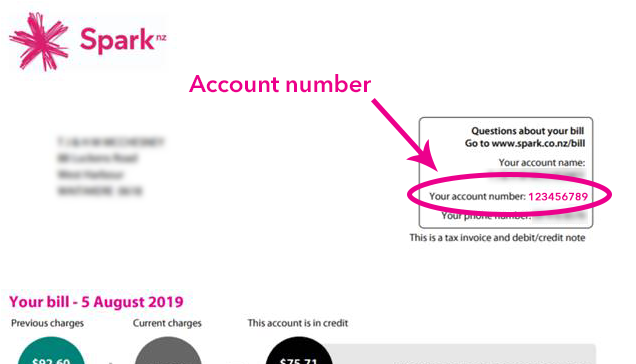
- Your Spark account number. If you are on a shared or family plan, you must provide the master account number.
How to Find Your ICCID Number (Prepaid customers only)
Your ICCID is a 16-digit number beginning with 64, located between the first two digits (89) and the last digit of the full SIM serial number.
Physical SIM: Your ICCID is printed directly on your physical SIM card.
eSIM — iPhone: Go to Settings > General > About. Your ICCID is listed under the eSIM section.
eSIM — Android: Go to Settings > About Phone (or About Device) > Status (or SIM Status / IMEI). Your ICCID will be listed here. Please note: Android menu names may vary depending on your device brand. If you are unable to locate your ICCID, refer to your device's user guide or contact the manufacturer.
How to Find Your Spark Account Number (Postpaid customers only)
Your Spark account number is required to complete a postpaid number transfer to Zeronet. Follow the steps below to locate it.
- Log in to your Spark account here.
- Navigate to Welcome Page.
- Your account number will be displayed on the top right corner of the welcome page.
You can also locate your account number on any invoices you have:
How to Transfer Your Number
The steps below apply to both SIM and eSIM transfers.
- You will receive an email from Zeronet prompting you to log in to your account at zeronet.co.nz.
- Once logged in, click the Start Number Transfer button.
- Fill in the required fields using the information listed in the Before You Start section above.
- Review your details and submit the porting request.
- You will receive a notification once your transfer has been completed.
How Long Does a Transfer Take?
Number transfers from Spark to Zeronet typically take around 2 hours once submitted.
Transfers are processed during standard business hours only. Requests submitted outside of business hours or on weekends will be held and processed at the next available time during business hours.
What Happens to My Spark Service?
Once your number transfer is completed, your mobile number will move from Spark to Zeronet. Your Spark mobile service associated with this number should end as part of the transfer process. If you have any remaining credit or outstanding matters with Spark, contact them directly.
Comments
0 comments
Please sign in to leave a comment.